
Sublime Text Editor
What is Sublime Text?
Sublime Text is a high-performance and feature-rich text editor for code, markup, and prose, known for its speed, flexibility, and minimalist interface. It is one of the most popular tools among developers.
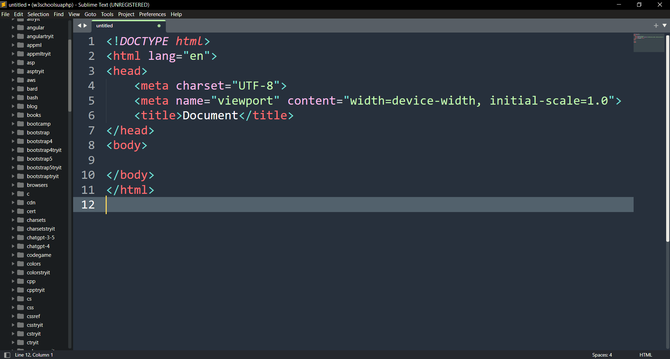
I hope you enjoy Sublime Text as much as I enjoy writing code with it.
Sublime Text official website: https://www.sublimetext.com/.
Download Sublime TextSublime Text. Official documentation
This user guide describes the Sublime Text 4 (Build 4200) program.
These pages contain the official documentation for Sublime Text. The unofficial Sublime Text documentation is a great additional resource that contains a wealth of information not covered in the official documentation.
About Sublime Text
Sublime Text is one of the most popular tools among programmers, web developers, and technical writers.
Sublime Text was created by Jon Skinner, a former engineer at Google and Sublime HQ Pty Ltd. (Sydney, Australia). First release (version 1.0): January 18, 2008.
Sublime Text is written primarily in C++ for high performance and speed, and its plugin API is based on Python. This combines the high performance of C++ with the flexibility of Python.
You can also learn more about Sublime Text on Wikipedia.
What can you do with Sublime Text?
Sublime Text is used to write and edit source code for almost any programming or markup language (HTML, CSS, JavaScript, PHP, Python, C++, Go, Rust, SQL, and many others), configuration files, and regular prose (notes). It also allows you to automate workflows (templates, macros, snippets).
Основні можливості Sublime Text
- Goto Anything: Quickly navigate to files, symbols, or lines of code with a few keystrokes.
- Multiple Selections: Allows you to modify multiple sections of text at once, greatly improving efficiency when editing repetitive structures or renaming variables.
- Command Palette: A single interface for quickly calling up rarely used or specialized commands without having to search for them in menus.
- Split Editing: Allows you to effectively use widescreen monitors by displaying up to four files or panels at once.
- Adjustability: Almost every aspect of the editor, including keyboard shortcuts, menus, and settings, can be customized using simple JSON files.
- Distraction Free Mode: A full-screen, minimalistic mode that leaves only your text on the screen.
- Package Control: An easy-to-use package (plug-in) manager that allows you to quickly find, install, and update extensions to enhance your editor's functionality. Access all features with Ctrl+Shift+P
- Minimap: A reduced overview of the entire file displayed in the sidebar for easier navigation.
- Cross-platform: Works on Windows, macOS, Linux.
Who uses Sublime Text?
- 🔹 Frontend developers (HTML, CSS, JavaScript).
- 🔹 Backend programmers (PHP, Python, Node.js etc.).
- 🔹 Sysadmins and DevOps (config editing).
- 🔹 Schoolchildren, students and beginners (easy and clear start).
- 🔹 Experienced developers who value speed and minimalism.
Sublime Text is often used by developers who prefer lightweight, fast tools that can be customized to their needs, as opposed to full-fledged, more "heavy" integrated development environments (IDEs).
📌 Advantages of Sublime Text over other editors
- ✅ Speed – opens huge files instantly, unlike some IDEs.
- ✅ Minimalism – nothing superfluous, a clean work environment.
- ✅ Flexibility and extensibility – Python plugins.
- ✅ Cross-platform – one interface on all OSes.
- ✅ Convenience of multi-cursor editing.
- ✅ Independence from large corporations (not owned by Microsoft or JetBrains).
📌 Disadvantages of Sublime Text
- ❌ Not free: there is a perpetual trial version, but the license costs ~99$.
- ❌ Fewer integrated tools than VS Code or WebStorm: Unlike VS Code, Sublime Text does not have built-in support for an integrated terminal, advanced debugging, and Git integration. These features require the installation of additional plugins.
- ❌ Closed source: it is not possible to officially modify the kernel.
- ❌ Difficulty of setup for beginners: While the setup is powerful, it often requires manual editing of JSON files, which can be less intuitive for beginners compared to the graphical interfaces of other editors.
- ❌ Development is slower than competitors: VS Code is updated faster.
- ❌ Sometimes additional plugins installed in Sublime Text conflict with each other and can cause errors in the work of both the editor itself and individual plugins. Sometimes the editor stops working altogether.
🚀 Sublime Text Development Prospects
Sublime Text continues to be actively developed, although at a slower pace than some of its competitors. Key areas of development include:
- API Updates: Regularly update the API for plugins, such as moving to newer versions of Python to ensure compatibility and modern features.
- Performance Improvements: Continuous optimization work, including the use of GPU rendering for a smoother interface.
- Support for modern technologies: Built-in support for popular languages (e.g. TypeScript) and protocols (e.g. Language Server Protocol - LSP) to provide "smart" autocompletion and navigation, previously only available through third-party plugins.
Sublime Text positions itself as a fast, reliable, and powerful "classic" editor that strives to combine its legendary speed with modern IDE capabilities.
💬 Motivational tips for beginners
- 🔍 Start small: install Sublime Text, try writing a simple HTML file.
- ⚙️ Explore the Command Palette — it's the heart of the editor.
- 📦 Install Package Control — it will open up a world of plugins.
- 🎯 Customize your environment — themes, fonts, keyboard shortcuts.
- 📚 Use official documentation and forums.
- 🧠 Don't compare yourself to others — everyone learns an instrument at their own pace.
- 💪 Think of Sublime Text as a productivity trainer — it teaches you how to write code quickly and cleanly.
🔹 Remember: Sublime Text is not a "heavy IDE", but a fast and clean editor that will teach you discipline in writing code and allow you to gradually master plugins to suit your needs.
Useful resources
- Package Control
- Forum Sublime Text
- Official Sublime Text documentation
- GitHub — Sublime Text plugins

